There’s nothing worse than realizing too late that you accidentally deleted hundreds of precious photos from your iPhone or iPad.
Fortunately, those photos are actually still on your device. That’s because Apple iOS only “marks” those files as deleted, but they’re fully recoverable until the space those photos occupies on the hard drive is overwritten by other files.
If you follow the steps below, you’ll be able to retrieve all of your deleted files (provided they haven’t been overwritten by other files since the time you deleted them).
Step 1:
You’ll need to download a copy of Wondershare’s Dr.Fone, which is able to recover the files you’ve deleted – including contacts, SMS, notes, call logs, photos, video, etc.
Dr. Fone can recover deleted files for a number of common scenarios:
- Data lost after factory restore
- Data lost due to iOS update
- Device stuck and not responding
- Data missing after jailbreak or ROM flashing
- Device locked or forgot password
- Unable to synchronize backup
Connect your iPhone or iPad device and begin to scan it with Dr.Fone.
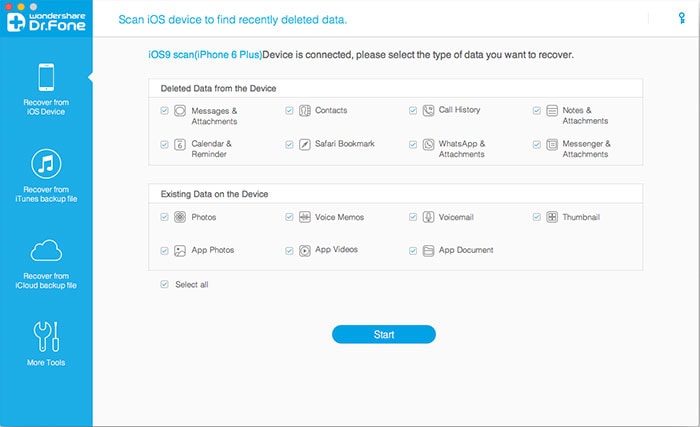
Step 2:
Preview the scanned data files in your device, to see what can be recovered.
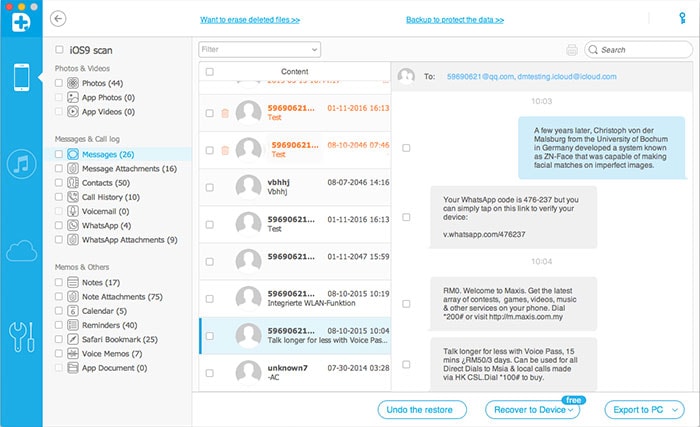
Step 3:
Select the files you want to recover. You can preview the files recovered by Dr.Fone and can also transfer them to your computer.
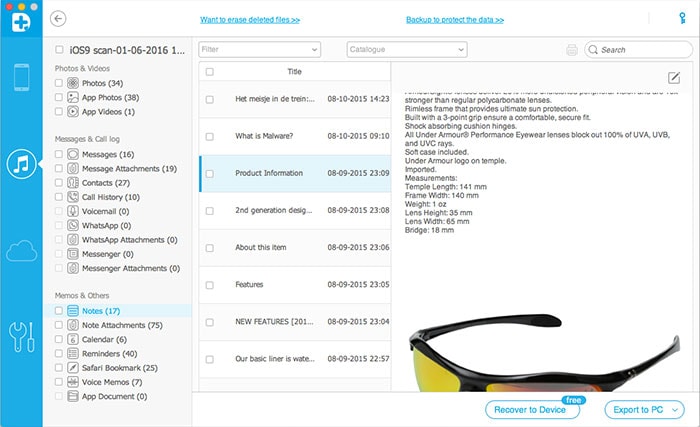
Here are some reviews from Dr. Fone customers:
This application recovered my deleted contacts and notes! The free trial allows you to view contact names and numbers and also copy/paste note contents. Great program, saved a lot of headaches!
Thank you so much for the help with my cell phone. You are the only ones out of numerous sites,& carriers that could help me with my issue & not loose my data, contacts & all my pictures. I just can`t thank you enough!!! – Joan
Get your copy of Dr. Fone now and restore your priceless files.