Most hacked websites look perfectly fine to the person who owns them. The attack is designed to hide from the one person most likely to notice it, so the site stays broken for months while the owner has no idea anything is wrong.
This kind of attack is called a conditional redirect. The hacking code looks for logged-in cookies to try to identify whether someone is managing the site, and then avoids redirecting anyone who is logged in. So when you log in to your own site, the malware checks that you're an admin and shows you the real site. When you visit from your home computer, it sees a desktop browser and shows you the real site. The bad stuff only fires when the visitor arrives from a Google search on a phone — things like a redirect to a sketchy pharmacy page, hidden spam links, or a fake crypto giveaway.
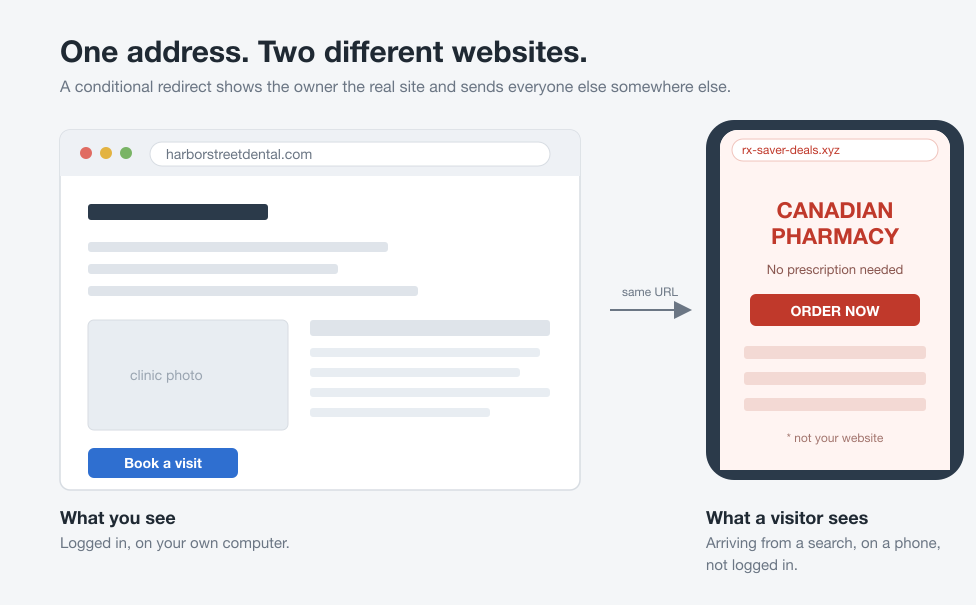
So if you suspect your site has been hacked, or you want to check once in a while just to be sure, here's where to look.
Where to look
Open Google and search for site:yourdomain.com with your actual domain. Scroll through the results. You're looking for pages you never wrote: titles in a different language, pages about pharmaceuticals, loan offers, replica watches, anything that doesn't belong. Hacked sites almost always have hundreds of these indexed, because one goal of the hacker was to get Google to list them.
Next, pull out your phone, turn wifi off so you're on cell data, and open the site in an incognito/private window — no login, no home network, not your usual browser. If the site redirects anywhere it shouldn't, you've found it.
Then log in to Google Search Console. If you don't have your site set up there, do it now — it's free and it's the fastest way for Google to tell you something is wrong. Look at the Security Issues tab. If Google has flagged your site as hacked or serving malware, it will say so plainly.
Signs from other people
Watch for these:
- An email from your hosting company saying your account is suspended or sending spam.
- A red warning page in Chrome or Safari when you or a friend visits the site.
- Your own emails from your domain suddenly landing in people's spam folders, which usually means your domain got blacklisted because the hacked site was sending out junk.
- A big drop in Google traffic with no explanation.
If you found something
If you found something, the cleanup has an order to it, and the step most people start with is the one that undoes the rest. I covered that in what to do if your website gets hacked.