If you've added an aftermarket amp to your car and now you've got a high-pitched whine that rises and falls with the engine RPM, welcome to one of the most frustrating troubleshooting projects in car audio. I chased this exact problem on my own system for weeks, tried every fix the forums recommended, and the whine stayed. What killed it wasn't on most of the lists I read, so I'm writing it down here in hopes it helps you.
The symptom is easy to identify. Start the car, turn the stereo on, and you hear a whine through the speakers that changes pitch as you rev the engine. Higher RPM means higher-pitched whine. It's usually there whether music is playing or not, and turning the volume down on the head unit doesn't make it go away. That last detail is a clue, and I'll come back to it.
The usual suspects
Here's what everyone will tell you to try first, and honestly all of these are worth trying because any one of them can be the actual cause on a given install.
- Add a ground loop isolator on the RCA lines. A ground loop between the head unit and the amp is a classic source of engine whine. The isolator breaks that loop by passing the audio signal through a small transformer. They're cheap and easy to install inline on the RCA cables. Mine didn't fix it, but it's the first thing most people try.
- Check that the head unit and the amp are grounded to bare metal. Both grounds need to go to clean, unpainted metal on the chassis, with short wires and tight connections. Paint, rust, or a loose ring terminal will give you a bad ground, and a bad ground is a magnet for noise. I pulled both grounds, sanded down to bare metal, and re-terminated them. Better connections, same whine.
- Route the RCA and signal cables on the opposite side of the car from the power wire. The power wire from the battery to the amp is running several amps of current and puts out an electromagnetic field. If your signal cables run alongside it, they'll pick that up as noise. Standard practice is power down one side of the car and signal down the other. I re-ran mine to make sure they were separated the full length. No change.
- Suspect the alternator. A failing diode inside the alternator can dump AC ripple onto the car's electrical system, and that ripple shows up as whine through the speakers. This one is expensive to chase, but when nothing else works you start eyeing the alternator. I ended up replacing mine. The whine was still there when I turned the car back on.
At that point I was out of ideas from the standard troubleshooting list, and I was pretty annoyed about the alternator.
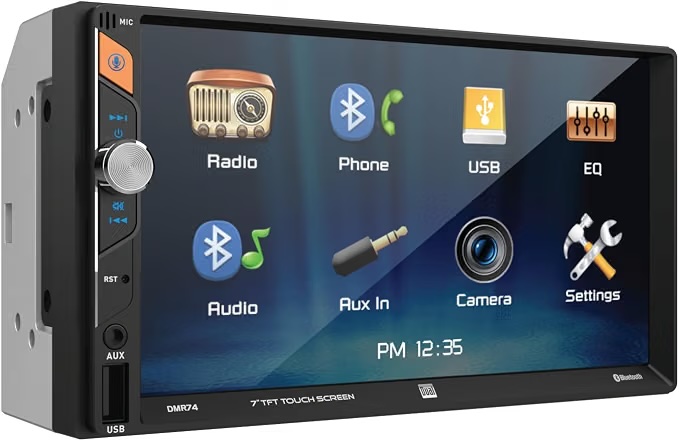
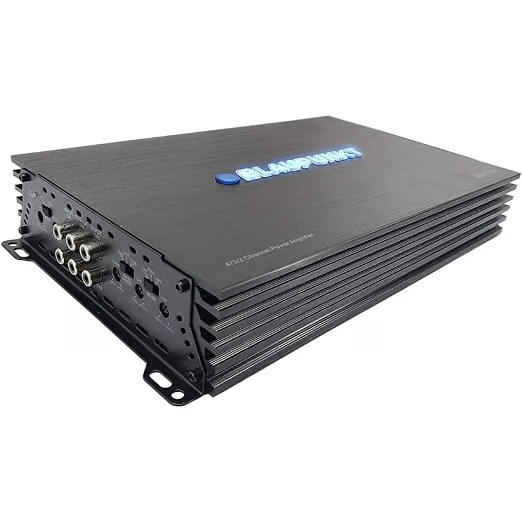
Btw, the stereo I have in my 2004 Ford F150 is a Dual Electronics DMR74 7-Inch Touchscreen and the amp is a Blaupunkt MP1404 (1500 W). I got both from Amazon for about $80-$85 each. I initially wondered if I should replace the head unit with a more expensive one, but after getting the whine fixed it turned out to be a great sounding stereo and also came with a backup camera. The amp also provides plenty of power!
The actual fix: turn the amp gain down
The gain knob on an amplifier is not a volume control. It's a level-matching control — it tells the amp how loud the incoming signal from the head unit is, so the amp knows how much to amplify it. Set the gain too high and the amp amplifies everything on the input line, including the tiny amount of electrical noise that's always present in a car's wiring. Music plus noise, both getting the same boost. The whine you're hearing might not be a wiring problem at all. It might be a normal, low-level noise floor that a hot gain setting has turned into something you can actually hear.
Mine was cranked almost all the way up because I wanted more output, and every bit of noise on the signal line was riding along with the music. I turned the gain down to roughly the middle of its range and the whine dropped to nothing. I got some of the volume back by turning the head unit up higher, which is exactly how it's supposed to work.
Setting gain by ear
The right way to set gain is to match the amp to the head unit's clean output level. Here's the by-ear version that works well enough for most installs:
- Turn the amp gain all the way down to start.
- Play a familiar song on the head unit and turn the head unit volume up to about three-quarters of its maximum. That's roughly where the head unit is still putting out a clean signal before it starts to distort.
- Slowly turn the amp gain up until the speakers sound loud and full, but back off the moment you hear any distortion or the whine start to creep in.
- Turn the head unit back down to a normal listening level and see how it sounds. If it's not loud enough, the answer is more head unit volume, not more amp gain.
If you've done all the usual noise fixes and the whine is still there, try the gain before you spend money on anything else. It costs nothing, it takes two minutes, and it might be the answer you've been chasing.
Leave a comment