Question: I occasionally want to take a picture of my Blackberry screen to explain to friends or coworkers how to do something on the phone, or to show them what a game looks like. Is this possible?
Question: I occasionally want to take a picture of my Blackberry screen to explain to friends or coworkers how to do something on the phone, or to show them what a game looks like. Is this possible?
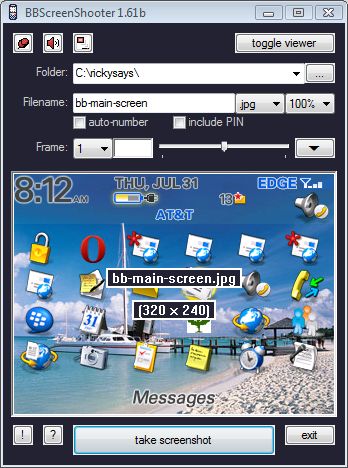
Answer: Yes, it's possible to take screen shots of your Blackberry device using a free program called BBScreenShooter.
You can even take psuedo-video of your Blackberry screen with the BBScreenStream program that takes snapshots every half second or so in a continuous loop - similar to video surveillance cameras.
You'll need the javaloader.exe that comes with the Blackberry development kit, which you can get from Motorola. The dev kit is a huge download though, which seems overkill for just one file - so I stuffed it in my downloads folder and you can get JavaLoader.exe here without having to download the whole dev kit.
Place JavaLoader.exe and bbscreenshooter.exe in the same folder, and then double-click bbscreenshooter.exe to run the application.
Make sure your Blackberry device is connected to your laptop using a USB data cable, which should have come with your Blackberry when you bought it (at least mine did from AT&T).
You can specify the image file type (bmp, jpg, png) and the folder where screenshots will be saved. Then just click the "Take Screenshot" button whenever you want a screenshot.
BBScreenShooter will save a copy in the folder shown at the top of the program, and with the file name that you type in.
Comments (10)
Everywhere I see, everyone mentiones this great program. Except, it requires a PC. I want to be able to take a snapshot WHILE using blackberry and forward it in an MMS or an attachment. Specifically, I needed to send a map of a location out of the BBMaps app to my wife. I jsut can't seem to find an app such as that. Would you know if such exists? Thanks! Alex.
Hi Alex. I'm right there with ya - would love to find a program that lets you take snapshots "while" you're on the blackberry, instead of having to hook up a data cable every time I want to do it. But alas, I haven't seen anything and am pretty sure the Blackberry operating system doesn't even support that functionality yet. I'm sure that once they do (if they ever do) there will be some programmers who jump to the challenge and provide software for screen capture. I haven't seen anything for the Mac yet either.
I ran the .exe file and the software loaded but got an error whe it tried to connect to my Blackberry, now it won't let me fix and won't see the BB no matter what I do. Any thoughts?
Do you have the bb connected with the USB data cable, and did you also download the javaloader.exe that's part of the blackberry development kit? It needs to be in the same folder as the bbscreenshooter program.
Thanks for sharing this tool. This is a very nice one. I hope they will also release an application where we can screen shot directly from our Blackberry without the need to attach in PC.
I just downloaded this and plugged my BB curve to my laptop and both of these programs worked great! I am new to the bb world and very pleased with the screenshot tool. Thank you! :-)
Hello Ricky, thanks for discussing my app. You should add, that only the latest javaloader.exe will work with newer devices. The current version has 108 KB.
QuickLaunch lets you take screen shots while on your bb.
To capture screen directly from your blackberry without any PC application review this link. You can just download CaptureIt into your blackberry assign a convenience key for the application y you are ready to go. http://www.simplehelp.net/2008/11/20/how-to-take-screenshots-of-your-blackberry-screen/
Hello. I have a blackberry 8520 smartphone. When i searched bbscreenshooter i couldnt find it on app world! I desperately need the app to show my friends some proof of something. What do i do now?