Question: How do I transfer photos from Razr phone to Mac OSX? I’m really looking for something free and I hope you can point me in the right direction!
Question: How do I transfer photos from Razr phone to Mac OSX? I’m really looking for something free and I hope you can point me in the right direction!
Answer: Good news for Mac users – I was able to do this using my Macbook which has Bluetooth built-in, and without using any additional software (sorry Windows users – you’ll have to buy third-party software to do this, which I wrote about here).
1. Enable Bluetooth on your phone
You’ll first need to enable your phone’s BlueTooth settings to make it visible to your PC or Mac, since at least on mine it shipped with Bluetooth disabled.
On a Razr phone use the following menu options to enable Bluetooth:
Settings –> Connection –> BlueTooth Link –> Setup –> Find Me
This will tell your phone to broadcast a Bluetooth signal to your laptop for about 60 seconds – plenty of time for your laptop to recognize the signal and “discover” the device.
2. Pair up your cell phone with your laptop
“Pairing” is another word for starting a conversation between your cell phone and your computer, with Bluetooth as the language.
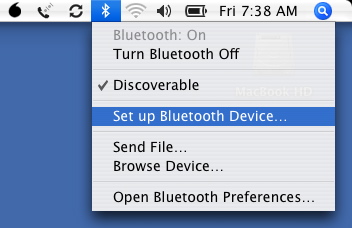 For OS X on a Macbook, follow these steps:
- Open Applications –> Utilities –> Bluetooth Setup Assistant.
- Select the “Mobile Phone” device type.
- Complete the pairing process.
You can also access the Bluetooth Setup Assistant by clicking on the Bluetooth icon in the menu bar at the top of your screen, and selecting “Set up Bluetooth Device” from the menu.
3. Browse the pictures on your phone
Your laptop will now be paired with your Bluetooth-enabled phone. Next, select “Browse Device” from the Bluetooth menu. Choose “Motorola Phone” from the list of Bluetooth devices.
You should see a “Browse” button that’ll let you see the folders on your Razr phone. Pictures will be in the picture folder, ringtones will be in the audio folder, and videos will be in the videos folder.
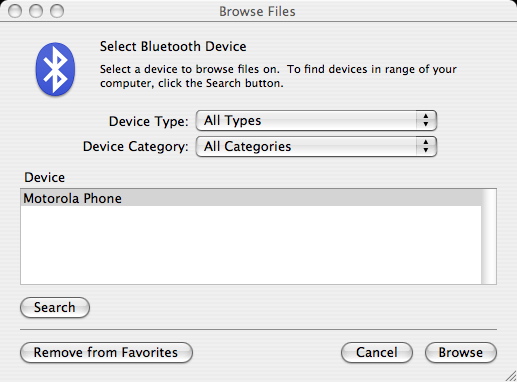
4. Copy photos to your computer
Just drag and drop the photos from your phone’s picture folder to your computer. Bluetooth doesn’t require any wires, and has a range of about 30 feet. You can even have your phone tucked away in your briefcase or backpack, and it’ll still be able to communicate with your computer.
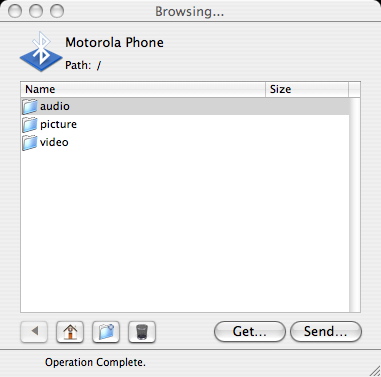
You can also transfer photos, videos, or ringtones from your computer to your cell phone the same way – just drop them in the right folder on your phone and Bluetooth will copy them over.
Hope that helps!
Got working today!
Got working today…thanks to your info, Rick! Really appreciate your fast response! Amazing! You made it possible for me become even geekier today! Love it!
Mary Ann
Thanks greatly for the info
Thanks greatly for the info Ricky!
Guess I’m screwed. I get a
Guess I’m screwed. I get a message that says “The device does not have the necessary services.” I have a Sanyo SCP-3200.
not working
I’m having trouble transferring my pictures to my Mac. When I select motorola phone a message appears saying :device does not have the necessary services”. What am I doing wrong?
Did you enable Bluetooth on
Did you enable Bluetooth on your phone?
yes,
yes,
yes, my phone is from
yes, my phone is from verizon and I read that they block this so you can buy from them others accessories, or something like that. Is there a way to hack it?
What I would like to see is
What I would like to see is an easy to use software to transfer contact info everytime I buy a new phone.
Yes, my phone says the same
Yes, my phone says the same thing. Is this because i have no memory card installed? Or should it work with the phone’s internal memory?
Thanks!
Thanks for the tip! This is exactly what I wanted to do, and your instructions are straightforward and easy to follow. And this would’ve been so much harder on a PC. 😉
These are great
These are great instructions, but like a few other people I got the final message, “device does not have the necessary services.” but I went through all the steps, both my laptop and phone were discoverable and are supposed to be able to send files via bluetooth. My laptop is the Mac OS X 10.4.11 and my phone is a verizon samsung model SCH-U900. Any advice?
Device does not have the necessary services
I have the same verizon phone. Were you able to resolve this issue as I’m getting the same message.
I can’t transfer files from
I can’t transfer files from my cellphone to my mac, it always appears a message saying that connection failed or something, and it also appears with other mobiles. what is wrong? both devices are visible and activated..
Yet another person who gets
Yet another person who gets the message “Device does not have the necessary services”. Verizon is my carrier – so if the rumor above is true, I guess I’m being blocked too.
Samsung
I Have the exact same thing happening. The bluetooth is paired but it wont browse.
Except i have a samsung link with a bell service provider
First class instructions. I
First class instructions. I found it really helpful until I needed to transfer the piccs from the phone to the mac, needless to say all I had to do was double click the photo and not drag and drop. Thanks Ricky for saving my memories.
motorola v mac
I tried and like those other people I got “device does not have necessary services” I don’t see any answers on this page-is there an answer or are the pics lost forever??
Sue
Pics
Most phones are not set up for BT or USB computer connectivity. You should be able to mail the pictures to your email account! Takes time and uses air time but you can save pics.
bluetooth transfer
You’re a genius! Thank you. I took several videos tonight on my LG Versa. Fortunately, I have a MacBook. Enabled Bluetooth on my phone, and Voila! Vidos transferred and ready for YouTube!
Thanks again! Toni
Nice job. I hope to give a
Nice job. I hope to give a try on vista, it may work in other way.
doesn’t work with verizon
this doesn’t work with the verizon motorola v3m. they’ve disabled it.
phone to Mac
I recently bought a Verizon phone and spent a half hour on the phone with their tech support trying to get photos onto my new iMac. Bottom line is VERIZON PHONES DO NOT SUPPORT TRANSFERS TO MACS! Shades of old Microsoft thinking — Verizon should know better. The net result of trying many different ways of getting my Mac to recognize the internal phone card was that we fried the card. Don’t know why, and I was fortunate that I didn’t have any photos on the card at the time (we were attempting to format “the disk” that the Mac insisted was being mounted). So be careful… I have a 30 day warranty on the card, so I will get a new one and be back to square one. I think you need to start with a USB cable that goes directly from the phone to the Mac — I was using a card reader with the tiny card in an adapter, but that could have added to the problem. Again I say: Verizon should have a Mac transfer protocol hardwired into its phones — no excuses Verizon!!! (probable excuse might be that they are staying way clear of anything iPhoneish!)
Syncing Verizon phones
Your remark, “Verizon phones do not support transfers to Macs”, is utterly false – some phones sync just fine. Also you can’t “fry the card” by software errors. I had a Sumsung SCH-u740 that synced just fine (MacOS 10.5) On the other hand, my Droid would not sync, even though it could connect via Bluetooth, but that’s likely more of a political issue between Apple and Google rather then Verizon.
My old Verizon LG phone
My old Verizon LG phone connected to my Mac just fine. However my new Verizon Samsung will not connect. It’s the phone & not Verizon.
transferring photos
Your instructions are very clear. I got as far as browsing the device (my phone did show up), but no folders appeared…nothing appeared. Did I miss something?
Your instructions are great,
Your instructions are great, thanks, but I ran into a problem with the browsing. When the browsing window comes up, the activity at the bottom says “last operation failed: bad request.” Do you know how to get around that? My phone shows up and it’s connected, but the files just don’t show up.
I’m having the same problem!
I’m having the same problem! Did you figure out a way to fix it?
pairing phone with macbook through Bluetooth
Ricky,
any hints or tips to get around the error message: “the device does not have the necessary services”?
Thanks in advance,
Adri
when i click on my pictures
when i click on my pictures or videos it is blank
Downloading RAZR photos to a Mac
Everything worked beautifully in your instructions until I tried to Browse for photo files, then I also got the message “Device does not have necessary services”. I did deactivate the ohone connection of this old RAZR. Is that the problem? Should I go buy minutes and send the photos to myself?
Thank you so much! I’ve
Thank you so much! I’ve been trying to figure out how to get the photos off my cellphone for years. This worked beautifully. Excellent instructions.
thank you, thank you! I am
thank you, thank you! I am so excited to finally have my photos on my Mac from my little cheap phone!!
Samsung A640 vs Razr
My Motorola Razr worked fine. But my wife’s Samsung(?) A640(?) did not work. It got the “device does not have necessary services”. I looked on my Bluetooth preferences and it lists services for each device. My Motorola had a service called OBEX file transfer which the Samsung did not. I am assuming the services are in the software, and the Samsung does not do file transfer (or at least not this one as provided by Sprint).
file transfer issue
I transferred a video file from my LG Dare to my mac via bluetooth with no issues. The only problem I have now is when I play my video on my mac there is no audio. I can’t seem to figure it out?
Help anyone
When you tell the video
When you tell the video where to save change the extention from .3g2 or whatever it is to .avi
That worked for me because I had the same problem.
THANK YOU!!!
Bluetooth totally worked! I didn’t have to buy a thing to get my pics onto my computer. You are a genius! I thank you. Thank you!! Thank you!!!
Works the other way round
I was having similar problems to some of those on this page: when I browsed my Samsung f480 from my Mac I wasn’t able to see the files in the My Photos folder on the phone, and I got the “last operation failed: bad request” message when I tried to download the folder.
I assumed that Samsung had disabled file transfer, as some suggested to get us to pay to send our files.
When I tried it the other way round, however, sending a jpg from the phone to the Mac via Bluetooth, everything went fine – so try that!
trasferring photos from phone to iphoto
Hi there, following your advice, I dragged photos from my mobile phone (using bluetooth) onto the iphoto folder. they seemed to have all gone through….Then without checking I deleted the photos on my phone, and now I can’t find them on iphoto. Could they be in temp folder? If so, how do I access the temporaryItems folder on my mac?
Many thanks,
LP
Hi Ricky,
I’ve followed your
Hi Ricky,
I’ve followed your instructions on pairing up my Mac computer to my Samsung mobile, however when the browsing window opens, it cant access the photos on my mobile. It also wont allow me to see my computer on my phone (not that I’m interested in doing that, I just want to put my photos onto my computer). How can I get it to work?
Bianca
i have a samsung phone , and
i have a samsung phone , and it will let me transfer files from the mac to phone , but not from phone to mac , anyone know what is wrong ?
i have the samsung SGH-A687
i have the samsung SGH-A687 and when it gets to the browsing part wand you’re suppose to just drag and drop the photos from your phone’s picture folder to your computer, it’s not letting me. it’s only letting me send files to my phone.
hi, is this bluetooth way
hi, is this bluetooth way free or do you pay for it?
When I click on the folders,
When I click on the folders, no files appear. Although, they are in my cell phone. Kindly guide. Thank you.
Ditto!!! Freakin genius.
Ditto!!! Freakin genius. This worked PERFECTLY after two years of frustration trying to figure out other ways of retrieving photos off of my old cell phone (and my cell phone “user guide” telling me my device is not compatible with Mac), I got every last photo transferred to iphoto in about 5 minutes. I wish I would have found this sooner but really, I cant thank you enough!!! 🙂
Thank you! I was trying to
Thank you! I was trying to send pics from my phone to my laptop… Thank god I found this!
Thank you!
Thank you!
Outstanding! thank you, I
Outstanding! thank you, I can finally get rid of this old phone and keep my pics.
THANKS!
I just got back from the At&T store, where I was told that the only way to get the photos off my phone was to email them individually. I have over 250!! I refused to take that for an answer. THANK YOU for these instructions that worked perfectly!
I successfully transfered
I successfully transfered photos from my old Verizon LG VX11000 enV Touch phone onto my MacBook Pro OS X. This was extremely helpful! Thanks!
Thank you! Wow, I’ve had
Thank you! Wow, I’ve had this Versa for something like 3 years and have 400+ pics on it and just now figured out how to get them on my MacBook — feel a bit of geek pride thanks to you!
Pairing phone to iMac
Ricky,
You are a genius. I have never used a site with info on how to do something where it actually works! I paired my LG phone to my iMac just like you said. It takes a minute for the computer to find the device and open a window–I had to reconnect a couple of times–but it worked great. Thank you so much for your excellent advice. I will be bookmarking your page for sure!
thank you very much:))!!
thank you very much:))!!
I did all of that. But Error pops up
I did all of that and it totally was working for a while then now when I do it, it says ‘You Can’t View contents of this folder due to general error. try again later’ but then it doesn’t work.. do you know what I can do to make it work again?
Ricky, you are the Geek of
Ricky, you are the Geek of Geeks! It worked from my Samsung A796 to OS X with pix and vids. A friend had told me I’d have to buy a program but I hunted online just in case. I’m eternally grateful!
I also have Verizon and
I also have Verizon and received the same message. However, I was able to send the pictures through bluetooth to my Mac from the phone itself. Go to the phone’s bluetooth and get to the page where it lists your devices. If you click on your Mac, it will say “Send Name Card” “Send Calendar Event” “Send Picture” and click send picture then select the pictures you want. By default, it will send them to “downloads.” Unfortunately, you can only send up to 12 pictures at one time. Sucks to do it this way but it’s better than losing them forever or buying crap from Verizon.
Thanks. Followed your
Thanks. Followed your suggestions precisely but they don’t work on my Android with Jelly Bean OS. Still get the message “The device does not have the necessary services.”
NEW QUESTION: My phone’s a
NEW QUESTION: My phone’s a non-smart LG from AT&T, and as far as I know I haven’t opted for Bluetooth. I didn’t know the phone needed a memory card before I took a bunch of photos, so I’m forced to e-mail them to myself one at a time. Most of them go ok, but for some I get an “unable to send” message. If I wait until I’m sending the next batch, the problem ones seem to go through. Any idea why?
I created a new question here
I created a new question here, along with an answer: https://rickysays.com/lg-phone-unable-to-send-multiple-photos-via-email
as many above have asked…..
as many above have asked…… what to do when the mac says “device does not have necessary services” ?
Thank you! It worked on my
Thank you! It worked on my Verizon LG flip phone. You just have to carefully follow the instructions, making sure to check discoverable on your computer and phone. Thanks so much.